


CoinStats - Crypto Tracker
4.52.68K Reviews
App Specs
- Version
- 5.31.0
- Updated On
- License
- Free
- Downloads
- 1,000,000+
- Developer
- Coin Stats, Inc . - Crypto Portfolio Tracker App
- Categories
- Finance
- Platform
- Android
Screenshots

 Analysis by AppCompare
When a portfolio is spread across an exchange, a wallet, and a few coins you check only now and then, even a simple question—“What do I hold, and how is it doing?”—can turn into a round of app-hopping. CoinStats - Crypto Tracker is built for that moment: it brings crypto tracking into one finance app so I can review a portfolio without treating every price check as a separate task. Its strength is the overview; its main trade-off is that an overview is only as dependable as the connections and records behind it.
Start with the portfolio you actually have
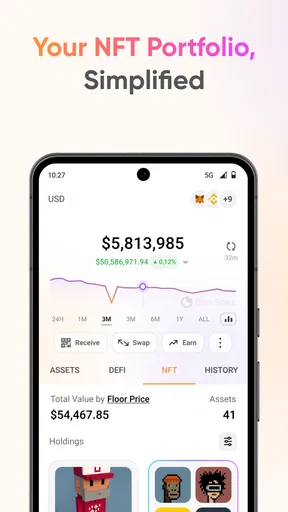
I would begin by deciding what I want the app to represent: one combined picture of my crypto, or separate views for different purposes. That distinction matters if I keep long-term holdings apart from money I use for more active trades, or if I track a shared plan separately from my own. A portfolio tracker becomes more useful when its organization reflects real decisions rather than simply collecting every balance into one undifferentiated total.
The setup can involve connecting accounts or wallets, and that is where I would slow down rather than tap through automatically. Before linking anything, I would check which connection option is being requested and make sure I understand whether I am granting read access or something broader. For tracking, the sensible principle is to give an app only the access needed for the task. If I prefer not to connect an account, I should first check which manual ways of recording holdings are available in the current app version instead of assuming every workflow works the same way.
Make the dashboard answer a useful question
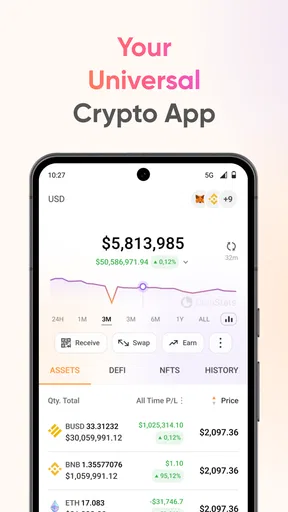
Once the portfolio is in place, I would use the main view to answer a small set of practical questions: what is the overall direction, which holding is changing the picture most, and whether I need to investigate anything further. That is more helpful than opening the app repeatedly just to watch a number move. A tracker can make market information easier to see, but it cannot tell me whether a price move fits my plan or whether I should act.
For a realistic everyday routine, imagine checking holdings during a lunch break after noticing a market headline. I would look at the portfolio first, then open the chart for the asset that seems relevant, and only then decide whether the news deserves more attention. If the headline concerns a coin I do not own, it may still be interesting, but it does not automatically require a change to my portfolio. Keeping that distinction between observation and action is one of the most useful habits a tracking app can support.
Use charts and alerts without letting them run the day
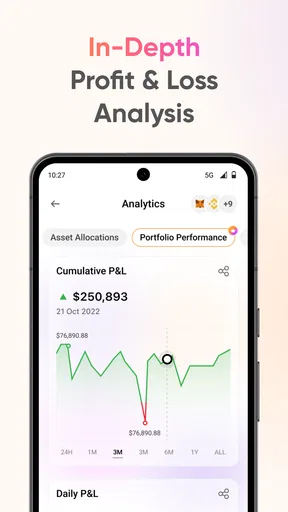
Charts are most useful to me when I have a specific comparison in mind: whether a move is brief or part of a longer pattern, or how one holding has behaved relative to another over a period I care about. I would avoid treating a chart as a prediction. It can show past movement and help me frame a question; it cannot remove uncertainty from a volatile market.
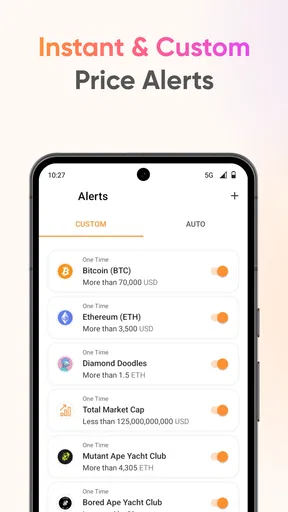
Price alerts can also reduce the need to keep checking manually, but I would set only a few thresholds tied to decisions I have already thought through. Too many notifications turn a helpful signal into background noise, and a price crossing a threshold is not, by itself, a reason to buy or sell. I would treat an alert as a prompt to review the context, not as an instruction.
Worth Reading Before You Choose

EA SPORTS FC Mobile 26 Is a Bigger Football Game, but It Takes Time

Flipboard Shows What News Apps Must Do Beyond the Feed

Switching to Android Auto Means Rethinking Your Driving Routine

Google Calendar Makes a Crowded Week Easier to Manage

Ludo King Makes the Most of the Minutes Between Plans

Baby Panda World Brings Quick Play to Modern Phones, but Its Game Library Feels Busy
Where CoinStats fits among the alternatives
Compared with checking balances directly in each exchange or wallet, a consolidated tracker is more convenient when the main job is to see several holdings together. The exchange or wallet remains the place I would use for account-specific actions, while a tracker is better suited to monitoring and comparison. That handoff is important: seeing a combined portfolio does not mean every asset is held in one account or can be managed from the same screen.
A spreadsheet can be a better choice for someone who wants complete control over categories, calculations, and record keeping, and who is willing to maintain entries by hand. An exchange’s own app may be simpler for a person who uses only that exchange and has no need for a cross-platform view. I would choose CoinStats when reducing the work of checking a dispersed crypto portfolio matters more than building a custom ledger from scratch.
Who is likely to get the most from it
I see the clearest fit for people who already hold crypto in more than one place and want a regular snapshot without opening each service in turn. It can also suit a curious beginner who wants to learn how portfolio values move, provided they understand that tracking is not investing advice. Someone who owns a single asset in one account and checks it rarely may find that the extra dashboard adds little; the existing account app may be enough.
It is also not the right tool for every financial task. If I need detailed tax preparation, a formal accounting record, or a reliable substitute for the statements issued by an exchange, I would use a purpose-built service or the original account records rather than assume a portfolio display covers those needs. The useful role here is visibility, not replacing every financial tool or the security practices of the services where assets are held.
A few habits that make tracking more reliable
One non-obvious source of confusion in any portfolio tracker is the difference between a displayed total and a complete account of every transaction. If I move assets between my own wallets, for example, I would check whether the way those holdings appear could make the same value look like two separate positions or leave a gap in the record. I would compare the app’s view with the source account after setting things up and again whenever a balance looks implausible.
I would also keep separate portfolios only when the separation helps me make a decision. Creating a view for every small idea can make the app harder to read, while one giant portfolio can hide distinctions I care about. A practical middle ground is to separate holdings with genuinely different purposes, then use the combined view when I want to understand the overall exposure.
Before relying on alerts, charts, or a synced balance, I would test the routine with a quick manual check against the account or wallet itself. That small handoff check is especially useful after changing a connection or moving assets. If the numbers disagree, I would investigate the source rather than assume the dashboard is automatically correct. This keeps convenience from turning into false confidence.
The First Encounter
When I first opened CoinStats, I was greeted with a clean and intuitive interface. No overwhelming graphs or jargon to scare away the crypto newbies. Instead, the app offers a straightforward dashboard where you can add your portfolios and start tracking them immediately. The setup process was a breeze! Just connect your exchange accounts or wallets, and CoinStats fetches your data automatically.
Features That Stand Out
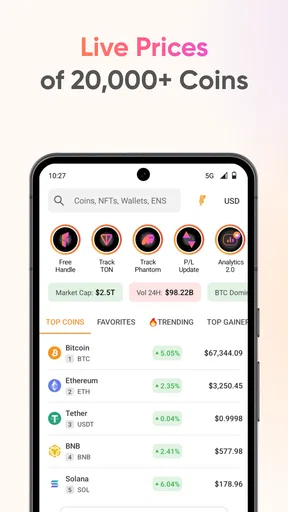
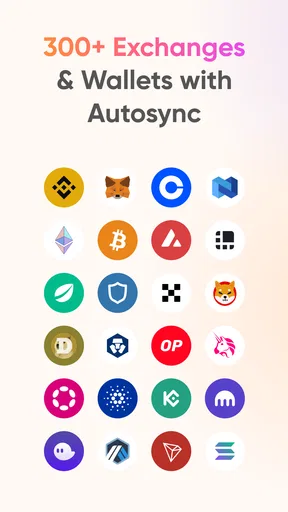
What really caught my eye were the app’s robust features. CoinStats supports over 8,000 cryptocurrencies and more than 300 exchanges. Whether you're a Bitcoin maximalist or an altcoin enthusiast, you’ll find your coin here. The app also lets you create multiple portfolios, which is great if you like to keep your investments diversified.
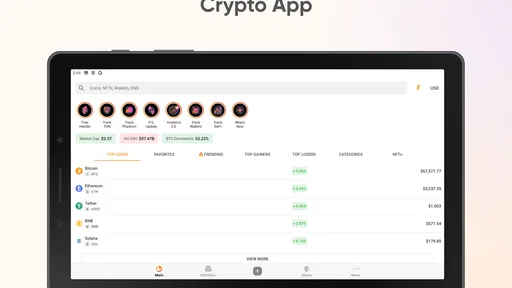
The real-time price updates and advanced charting tools are a dream for anyone who likes to keep a finger on the pulse of the market. The charts are interactive and allow for deep dives into price histories, perfect for spotting trends and making informed decisions.
Managing Alerts and News
CoinStats doesn’t just stop at tracking; it also keeps you informed. The app allows you to set up custom alerts for price changes, which is crucial in the volatile world of crypto. I found this feature especially handy for not missing out on any market opportunities. Just set the parameters, and you’ll get a notification if your chosen coin hits them.
Additionally, the app aggregates crypto news from various sources to keep you updated with the latest happenings. Whether it’s a new regulatory policy or a groundbreaking blockchain development, you’ll hear about it here first.
Security and Privacy
Security is a big concern when dealing with digital assets, and CoinStats doesn’t take this lightly. The app uses military-grade encryption to protect your data. Plus, it supports two-factor authentication, adding an extra layer of security. You can also rest easy knowing that CoinStats doesn’t store your keys or require you to provide them. Your privacy is respected, which is a huge plus in my book.
Room for Improvement
While CoinStats is packed with features, there are a few areas where it could refine its game. Some users have noted occasional syncing issues, which can be a bit of a headache when you want up-to-date information. However, the app’s developers are pretty responsive and seem to be continuously working on improvements.
Another consideration is the premium subscription. While the free version is quite comprehensive, the premium features offer more advanced analytics and unlimited exchange account connections. Whether that’s worth it depends on how deep into crypto you are.
The Final Verdict
All in all, CoinStats - Crypto Tracker is a solid choice for anyone looking to keep their crypto investments organized and informed. Its user-friendly design, coupled with powerful features, makes it a must-have tool for both new and seasoned investors. Sure, it has its quirks, but the pros definitely outweigh the cons.
If you’re ready to take the guesswork out of managing your crypto portfolio, give CoinStats a try. It’s like having a personal crypto assistant in your pocket, ready to keep you on top of your game. Happy investing!
What to expect before installing
CoinStats is a free finance app from Coin Stats, Inc . - Crypto Portfolio Tracker App. It has a 4.5 average from around 104,000 ratings, with about 2,700 written reviews, and has passed over a million installs. It is rated for Everyone, first released on April 27, 2018, and version 5.28.3 requires Android 7.0 or later. Those details make it accessible to many Android users, though the app’s usefulness still depends on whether its portfolio workflow matches the way you hold assets.
The free starting point is welcome, but I would look at the in-app purchase range before building my routine around paid tools. Purchases run from $19.99 to $749.99 per item, so the upper end is substantial. I would use the free experience first and identify a specific limitation I need to solve before paying. If the only reason to upgrade is curiosity about extra analytics, I would wait until I know those features would change a decision or save meaningful time.
When a tracking workflow breaks
The most common point of friction is not necessarily the dashboard itself; it is the handoff between an account, a wallet, and the tracker. A connection can need attention, a balance can take time to refresh, or an asset movement can make the displayed picture look different from what I expected. Since syncing issues can occur, I would not use a single screen as the final authority when I am about to make a consequential decision. I would verify the relevant balance at its source.
There is a second limitation to keep in mind: a broad portfolio view can make many assets feel equally important. In practice, a watchlist or chart full of movement can encourage needless checking. I would decide in advance which holdings deserve alerts and which are simply there for reference. That small bit of discipline helps the app remain a monitoring tool instead of becoming a source of constant distraction.
Choosing the right level of detail
For an occasional holder, the best outcome may be a quick check of a combined portfolio and then closing the app. For a more engaged investor, separate portfolios, charts, news, and alerts can support a repeatable review: check whether data has synced, scan the overall position, inspect only a meaningful change, and confirm any next step in the relevant exchange or wallet. The process is more dependable than reacting to every notification because it gives each tool a clear job.
I would skip CoinStats if I want a hands-off investing service, a place to execute every kind of transaction, or a guaranteed record for taxes and accounting. A tracker does not remove the need to understand where assets are held, keep source records, or make my own choices. But for someone who already manages crypto across several services and wants a clearer daily snapshot, it can reduce the friction of checking them one by one. My recommendation is to start small, verify the connections, and keep the app’s role focused on visibility.
Pros
- User-friendly interface for easy navigation.
- Real-time tracking of multiple cryptocurrencies.
- Customizable alerts for price changes.
- Secure and private with data encryption.
- Integration with multiple wallets and exchanges.
Cons
- Limited features in the free version.
- Occasional sync issues with exchanges.
- Ads can be distracting for free users.
- Some advanced tools need a subscription.
- Learning curve for beginners in crypto.
FAQs for CoinStats - Crypto Tracker
What features does CoinStats offer for tracking cryptocurrencies?
CoinStats provides a comprehensive suite of features for tracking cryptocurrencies, including real-time price updates, portfolio management, and detailed analytics. Users can connect multiple wallets and exchanges to monitor their assets in one place. Additionally, the app offers news updates and alerts for significant market changes, making it a robust tool for crypto enthusiasts.
Is CoinStats available for both Android and iOS devices?
Yes, CoinStats is available for download on both Android and iOS platforms. The app provides a seamless experience across both operating systems, ensuring that users can access their portfolio and market data anytime, anywhere. The interface is user-friendly and designed to accommodate both beginners and advanced users.
How does CoinStats ensure the security of my crypto data?
CoinStats takes security seriously by implementing industry-standard encryption to safeguard user data. It allows users to connect their wallets and exchanges securely without storing any sensitive information. Additionally, CoinStats offers the option to enable two-factor authentication for an added layer of security, ensuring peace of mind for its users.
Can I set up alerts for specific cryptocurrency price changes in CoinStats?
Yes, CoinStats allows users to customize alerts for various cryptocurrencies. You can set specific price thresholds, market cap changes, or volume increases. When your set conditions are met, you’ll receive instant notifications, helping you to make informed decisions quickly without constantly monitoring the market.
Does CoinStats support portfolio management for multiple cryptocurrencies?
Absolutely, CoinStats excels in portfolio management by supporting a wide range of cryptocurrencies. It enables users to track their assets across multiple exchanges and wallets in one unified view. The app provides detailed analytics and performance reports, helping users to manage their investments effectively and stay on top of market trends.


